Instagram Hashtag Strategy for Small Accounts
What hashtags still do, what they stopped doing, how to pick a set of five, and the captions and keywords that now do more of the work.
For years the advice was to paste 30 hashtags under every post. That advice is out of date. In December 2025 Instagram said it would gradually reduce the limit to five per post and Reel, down from 30, according to Business Today. Adam Mosseri, who runs Instagram, had already said in February 2025 that hashtags don't work to increase reach.
Some blogs still say the limit is 30, and a gradual rollout means accounts may differ. Try posting with six tags, and your own app will tell you. Either way, the strategy below works with five.
What hashtags do now
A hashtag is a label. It tells Instagram what your post is about, and it puts your post on a topic page where a few interested people may browse. It helps with classification and search. Hashtags don't work as a distribution engine, so tagging your post #love doesn't get it shown to anyone.
For a small account that's fine. An accurate label helps the right people find your post, and how those early viewers respond decides what happens next. A few specific tags will do that better than a long list of generic ones.
How to pick your five
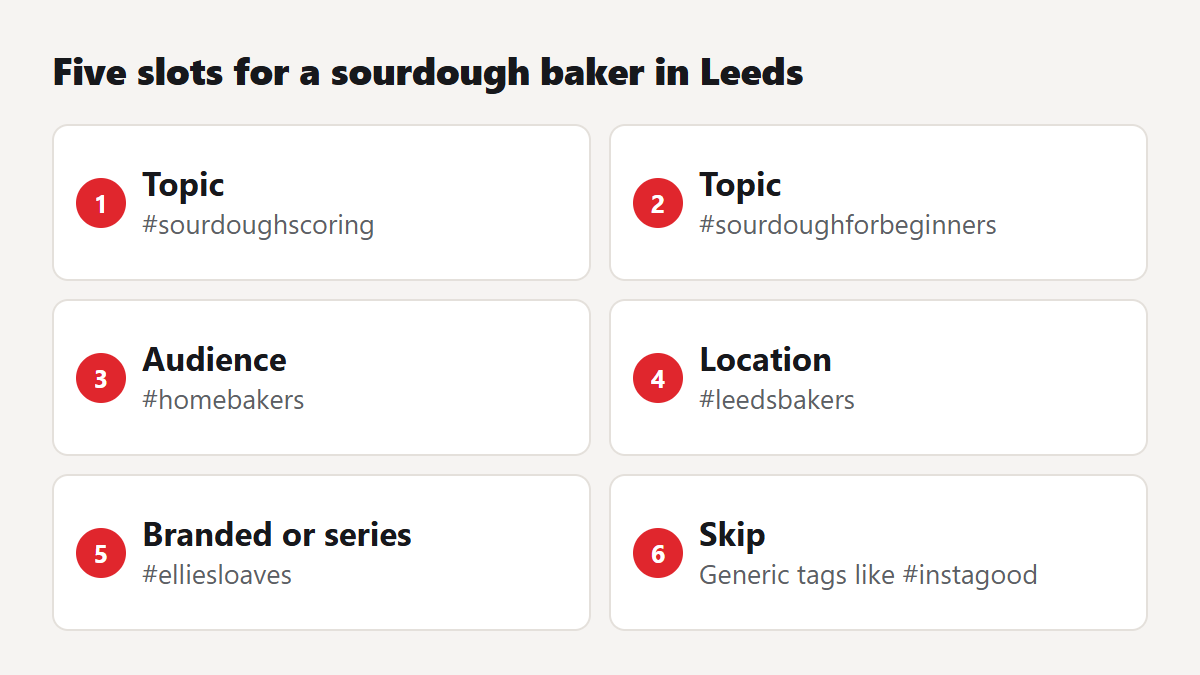
We'd use the slots this way. It's our own rule of thumb, and you should drop any slot that doesn't apply.
- Two topic tags that describe exactly what's in the post. Think #sourdoughscoring, and avoid #food.
- One audience tag that names who it's for, like #homebakers.
- One location tag if your audience is local. Local tags are among the most useful for a small business, because they're small and they carry clear intent.
- One branded or series tag that you own, so that people can find the rest of your work.
Each tag has to pass one test: would somebody searching this be pleased to find your post? If not, leave it out.
Finding the right tags
- Type your topic into Instagram's search and look at the tag suggestions.
- Open a few, and look at the recent posts. Are they from accounts like yours? Are they real posts or spam?
- Look at what similar accounts of your size use on their best posts.
- Use our free hashtag generator to get a list of ideas from a keyword, then cut it down by hand.
- Skip anything huge and generic, like #instagood. Your post would be gone from those pages in seconds, assuming anybody looks at them.
- Skip anything that's been banned or restricted. If a tag's page shows few or no recent posts, or a warning, don't use it.
Keywords do more than tags now
Instagram search reads more than tags. Your name field, bio, caption and on-screen text all tell it what you're about, and people search Instagram much like a search engine. Spend your effort here first.
| Where | Weak | Better |
|---|---|---|
| Name field | Ellie B | Ellie | Sourdough for Beginners |
| Bio | Bread lover | Teaching home bakers to make their first sourdough loaf |
| Caption opening | Happy Sunday! | How to score sourdough without a lame: three cuts for beginners |
| On-screen text | Wait for it | Why your sourdough is flat |
Saying your keyword aloud in a Reel can help too, because Instagram can read captions generated from speech. It also helps people watching with the sound off.
Where to put them
Use the caption, at the end. Putting tags in the first comment used to be popular, largely for looks. With five tags there's no need to hide them. Keep them readable: #HomeBakers in mixed case is easier for screen readers, and it's a small kindness that costs you nothing.
Should you repeat the same tags?
Don't paste the same block on every post. Keep your branded tag and your location tag, and choose the topic tags for each post. A carousel on shaping and a Reel on starters are about different things, and the tags should say so. Identical blocks on every post have long looked spammy, and they don't tell Instagram anything new.
Testing what works for you
Insights can show how people found a post, so run a small test over a month.
- Pick two tag sets for a similar type of post.
- Use each on four posts.
- Note the reach, profile visits and follows for each set.
- Keep the winner and test one new tag against it next month.
Be realistic about the result. A change of tags won't turn a weak post into a strong one. Hashtags help people find you, and your content decides whether they stay. If your test shows no difference between the two sets, that's a fair result too: it tells you to stop spending time on tags and put it into your openings.
Mistakes to avoid
- Using tags that have nothing to do with the post, because they're trending. It puts you in front of the wrong people, and they'll scroll past.
- Assuming tags caused a reach drop. If yours has fallen, our reach guide will help you find the real cause.
- Paying for "secret hashtag lists". If a list were secret and worked, nobody would need to sell it.
- Tagging a post with your competitors' branded tags. It looks spammy, and their audience sees through it.
A five-minute routine for each post
- Write the caption with your main keyword in the first line.
- Choose two topic tags that fit this post exactly.
- Add your audience tag and location tag if they apply.
- Add your branded tag.
- Read them through and ask if each one would please a searcher.
That's enough for almost any post, and it should take you less time than it takes to read this list. Spend the time you save on the first two seconds of your next Reel, which will do far more for you. When you're ready for a wider plan, read our guide to your first 1,000 followers, and try the rest of our free Instagram tools, including a font generator for your bio. If a good post needs a small start, likes are available, though no order changes what your tags can do.
Real, paced delivery for Instagram, TikTok, YouTube and 20+ more platforms — with a free 2-year refill on every order.